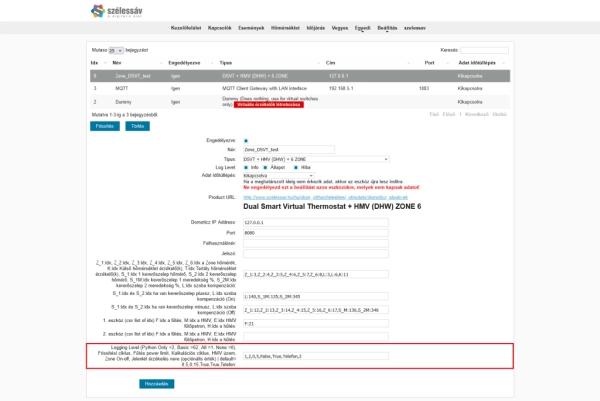
The seventh step in configuring DSVT is setting the additional parameters that influence the system's general operation.
These settings determine the logging level, control cycle intervals, adaptive heating behaviour, domestic hot water functionality, zone valve control mode, and presence detection.
For most installations, the default values provide a suitable starting point. Parameters should primarily be changed when required by the installation's configuration or operating characteristics.
The additional operating parameters are available in the DSVT hardware settings. Some of them can also be configured through the plugin's dedicated HTML configuration interface.
The following image shows the configuration fields for these additional settings.
Before changing these settings, it is recommended to understand their individual functions, as they may affect the system's response time and control behaviour.
The Logging Level parameter controls the level of detail in the log messages generated by DSVT.
Logging helps verify plugin operation, identify configuration errors, and analyse control processes.
Log messages appear in the Domoticz log.
| Setting | Value | Purpose |
|---|---|---|
| None | 0 | Disables additional logging. |
| All | 1 | Detailed logging for operational analysis. |
| Python Only | 2 | Python-related diagnostic logging. |
| Basic | 62 | Basic logging configuration. |
Logging values must be entered according to the options supported by the plugin.
The logging levels do not necessarily form a simple numerical sequence of increasing detail. Therefore, use the specified values for the desired logging mode.
More detailed logging can be particularly useful when:
During normal operation, continuously using the highest logging detail is generally unnecessary.
Important: detailed logging may increase the size of the Domoticz log, particularly during extended operation.
The update interval determines how frequently DSVT performs regular control and status update operations.
This parameter influences how often the system responds to measured temperatures and changes in control conditions.
5 minutesThe minimum configurable interval is:
2 minutesFor general applications, intervals longer than 10–15 minutes are not recommended.
A shorter update interval allows control decisions to be made more frequently.
This can be beneficial in systems where the controlled temperature changes relatively quickly.
However, excessively frequent processing may increase system load and cause unnecessary switching operations in some equipment.
A longer interval results in less frequent control interventions.
This may be acceptable for certain systems with high thermal inertia, but it can delay the response to changes in room temperature.
Recommendation: for an initial installation, keep the default 5-minute update interval and only modify it based on observed system behaviour.
The Heating Power Limit is one of the parameters used for adaptive heating control.
During operation, DSVT considers indoor and outdoor temperatures as well as the thermal inertia of the building.
Based on these factors, the system can calculate a Power value used to determine heating demand.
The described control range is:
-10 ... +15The Power value is a calculated control indicator, not the actual electrical or thermal output of the heat source expressed in kilowatts.
The Heating Power Limit influences the conditions under which DSVT permits heating within the hysteresis range.
Conventional thermostats generally switch based on the difference between measured and target temperatures and a fixed hysteresis.
DSVT's adaptive control can additionally consider the building's thermal behaviour and outdoor conditions.
The purpose is to avoid making heating decisions solely on the basis of the instantaneous temperature difference.
An incorrectly configured threshold can change the system's heating activation and deactivation behaviour within the hysteresis range.
When fine-tuning this parameter, consider:
Important: the Power Limit is not the same as the maximum permitted output of a heat pump or boiler, and it does not replace the equipment's own power limitation functions.
The calculation interval determines how often DSVT recalculates the Power value used by the adaptive heating algorithm.
This is a separate parameter from the system's general update interval.
15 minutesThe recommended minimum calculation interval is:
2 minutesThe interval should be selected according to the thermal inertia of the building and heating system.
The Update Interval determines the frequency of regular control and status processing.
The Calculation Interval determines how often the calculated Power value used by adaptive control is updated.
For example, with the default configuration:
This means that the two functions can operate on different schedules.
Selecting suitable intervals can help maintain balanced control, particularly in systems with slow temperature changes.
The DHW Mode setting determines whether DSVT enables the domestic hot water control function.
TrueThis is the default value.
When enabled, the DSVT DHW control function is available, and its associated control devices may appear in Domoticz.
If a DHW tank is used, the appropriate temperature sensors and switching devices must also be configured.
FalseIf DSVT is used exclusively for space heating or cooling, and domestic hot water control is not required, this parameter can be set to False.
This disables the DHW control function and can also hide its associated operating mode selector.
Recommendation: if the installation does not control a DHW tank, disable this function so the interface displays only the control options that are actually used.
The Zone On-Off setting determines the switching configuration used for zone valves.
Heating and cooling systems may use valve actuators with different electrical operating methods.
TrueThis is the default setting and applies to the most commonly used zone valves controlled by a single switching output.
In this configuration, activating or deactivating one relay or switching output determines the valve's operation.
Typical examples include:
FalseThis setting can be used for zone valve arrangements that require separate control outputs.
In this case, opening and closing operations may be performed through separate switching devices.
The appropriate switches must be assigned using the On and Off control fields described in the previous configuration step.
Important: this setting must match the actual electrical operating method of the valve actuator. A single- or two-control-wire arrangement is not the same as a valve being normally open or normally closed.
DSVT supports operating mode selection based on presence detection.
The Presence Detection Name field specifies the name of the presence sensor or presence detection group whose state is used by DSVT.
The system uses the logical state of the assigned presence signal:
Depending on the selected DSVT operating mode, presence detection can be used to switch automatically between Normal and Economy temperature targets.
The presence state can be obtained from several sources, including:
For DSVT, the important requirement is that the presence signal with the configured name is accessible and provides a reliable logical state.
When nobody is present in the building, the system can apply Economy temperature targets according to the selected operating mode.
When presence is detected again, DSVT can return to Normal temperature targets.
This can help reduce energy consumption without manually changing the target temperature in every room.
Important: presence detection behaviour depends on the selected DSVT operating mode. Automatic temperature target switching does not occur in every control mode.
Some additional settings are directly related to one another.
For example, the following parameters collectively influence adaptive heating behaviour:
When modifying parameters, it is advisable to change only one setting at a time and then observe the system's behaviour for an appropriate period.
This is particularly important for underfloor heating systems, where thermal inertia can delay the effects of adjustments.
For a new installation, using the default DSVT operating parameters is recommended initially.
| Parameter | Initial Setting |
|---|---|
| Logging Level | 0 – None |
| Update Interval | 5 minutes |
| Calculation Interval | 15 minutes |
| Heating Power Limit | Keep the default value |
| DHW Mode | True if DHW control is required |
| Zone On-Off | True for single-control-wire valves |
| Presence Detection Name | Name of the actual presence detection group |
The Logging Level and timing parameters may also be included in the mandatory Operating parameters field of the DSVT hardware module.
Its default value is:
0,5,15,0,NoneOnly modify this parameter sequence according to the format required by the DSVT version being used.
After modifying and saving the parameters, verify that DSVT operates correctly.
Pay particular attention to:
If the system does not behave as expected after a modification, restore the previous value of the last changed parameter and check the Domoticz log.
DSVT's additional operating settings allow the control system to be customised in greater detail.
The logging level supports troubleshooting and operational monitoring, while the update and calculation intervals determine the timing of control operations.
The Heating Power Limit is a parameter of the adaptive heating algorithm that influences operation within the hysteresis range.
The DHW Mode, Zone On-Off, and Presence Detection Name settings allow the system to be adapted to the equipment and automation functions actually used.
Correctly selected operating parameters can contribute to stable, energy-efficient DSVT operation adapted to the thermal characteristics of the building.