DSVT provides a modern HTML5-based web interface through which all important heating and cooling system parameters can be configured.
However, in some situations, using a physical control device similar to a conventional room thermostat may be more convenient.
This can be particularly useful for users who prefer to adjust the temperature directly using a wall-mounted device without having to use a computer or smartphone.
DSVT supports external thermostats and temperature setpoint control consoles.
These devices allow users to specify their desired temperature directly, while DSVT continues to perform the actual heating and cooling control.
DSVT can use Domoticz devices that provide a compatible temperature setpoint function as external control consoles.
For example, a BHT-6000 room thermostat integrated into Domoticz through Zigbee can be used for this purpose.
The thermostat's display and controls allow the user to adjust the desired temperature easily.
DSVT can use the console's temperature setpoint according to the selected operating mode.
Important: the external thermostat must be properly integrated into Domoticz. Its temperature setpoint must be accessible and updated correctly for DSVT to use it.
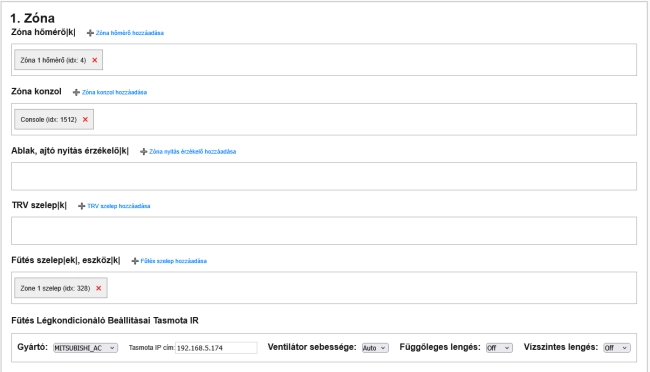
External consoles are assigned using their Domoticz device identifiers (IDX).
The corresponding configuration key is:
C_x:idxThe x represents the number of the zone to which the console is assigned.
For example:
C_1:idx C_2:idx C_3:idxReplace idx with the actual Domoticz identifier of the temperature setpoint device.
Assignments can be configured in two ways:
The HTML configuration interface can be accessed at:
/#/Custom/DSVT_HMV_ZONE_12Using the HTML interface is recommended because it makes selecting devices and assigning them to zones easier.
DSVT allows the same temperature setpoint console to be assigned to multiple zones.
It is even possible to use a single thermostat to set the target temperature for all zones.
This can be useful in buildings with several independently controlled heating circuits where the user wants to adjust their target temperatures using one central control device.
Even when sharing the same console, individual zones can continue to operate independently according to their own temperature sensors and control conditions.
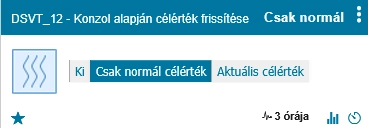
DSVT provides three operating options that determine how the target temperature entered on an external console affects zone control.
The appropriate behaviour can be selected using the settings available in the DSVT interface.
When the "Update target temperature from console" option is disabled, the temperature setpoint entered on the console does not affect zone control.
In this mode:
This option is useful when an external thermostat is available but manual adjustments made on it should not affect system operation.
When "Update target temperature from console" is enabled, the console's temperature setpoint can be used during Normal zone operation.
In this case:
This mode is suitable when users should be able to adjust the temperature easily while retaining the system's automatic energy-saving functions.
When "Current target temperature from console" is also enabled, the temperature entered on the console overrides the currently applied target temperature.
In this mode:
This setting is useful when the user wants to specify the desired room temperature independently of the central automatic setpoint selection.
Important: this feature overrides temperature setpoints, not the system's safety protections. Cooling dew point protection, equipment operating limits, and other safety conditions must remain active.
| Operating Mode | Effect of the Console | Automatic Temperature Targets |
|---|---|---|
| Disabled | No effect on zone control. | Continue operating normally. |
| Normal target override | Changes the Normal temperature setpoint. | Special operating modes retain their own setpoints. |
| Forced override | The console determines the currently active target temperature. | Automatic setpoint selection can be overridden. |
The appropriate operating mode depends on how much control users should have over the automatic temperature regulation system.
DSVT also supports assigning multiple temperature setpoint consoles to a single zone.
In this case, the system calculates the arithmetic average of the target temperatures entered on the consoles.
Suppose three consoles are assigned to the same zone:
The average target temperature is:
(21.0 + 22.0 + 23.0) / 3 = 22.0°C
DSVT can then use this calculated target temperature according to the selected console control mode.
This feature is rarely necessary in everyday use, but it can be useful for combining settings from multiple control locations or testing different control arrangements.
It is important to distinguish between measuring the actual room temperature and specifying the desired target temperature.
DSVT zone control uses two separate values:
Using an external thermostat as a temperature setpoint console does not necessarily mean that its built-in temperature sensor must also be used for zone temperature measurement.
These two functions can be configured separately.
For example, the target temperature can be adjusted using a wall-mounted thermostat, while the actual room temperature is measured by one or more independent sensors.
After saving the configuration, verify that the external temperature setpoint device operates correctly.
During testing, check the following:
It is recommended to test each operating mode separately.
If the target temperature does not change as expected, check the console assignment, the relevant control settings, and the Domoticz log.
DSVT supports external thermostats for simple adjustment of zone temperature targets.
Consoles can be assigned to individual zones using the C_x:idx configuration key, and the same console can be shared by multiple zones.
The system provides three operating options: ignoring the console value, updating the Normal temperature setpoint, or forcibly overriding the currently active setpoint.
Multiple consoles can also be assigned to one zone, in which case DSVT uses the average of their target temperatures.
External temperature setpoint consoles combine the simplicity of conventional thermostat controls with DSVT's advanced automatic heating and cooling regulation.