Wi-Fi or Network-Based Presence Control
The system can detect whether registered devices are connected to the home network and use this information in the operation of the control modules. This allows the automation system to adapt its behaviour according to whether someone is currently at home.
Presence detection is included in the Szélessáv Műhely OpenWrt firmware, but it can also be installed as a standalone module on a standard OpenWrt system. A separate guide for installation and configuration is available under the Installation on an OpenWrt Router menu item.
Presence Detection Methods
The system provides two different methods for determining presence.
Wi-Fi-Based Presence Detection
- A fast and accurate method because OpenWrt directly knows which Wi-Fi clients are currently connected.
- Detection is based on active Wi-Fi connections, so there is no need to continuously ping the devices.
- It is primarily suitable for detecting the presence of phones, tablets and other devices connected through Wi-Fi.
- When multiple OpenWrt access points are used, clients connected to the additional access points can also be included in presence detection.
Network-Based Presence Detection
- Both Wi-Fi and wired network devices can be monitored.
- The system determines the device IP address from DHCP information and then checks its availability using ping.
- The response time depends on the configured ping timeout and the number of devices being checked.
- This method can also be used for devices that are not directly visible to OpenWrt as Wi-Fi clients.
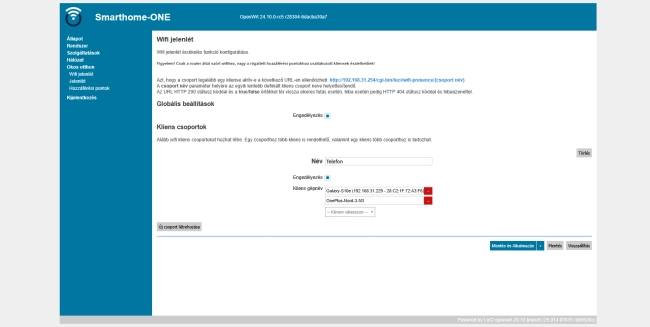
Creating Presence Groups
- Multiple independent presence groups can be created in the system.
- Multiple network devices can be assigned to each group.
- A group is considered active if at least one of its associated devices is present.
- The same device can be assigned to multiple presence groups.
- The created groups can be used by DSVT and other automation modules in their presence-checking logic.
Important: group names are case-sensitive, so uppercase and lowercase letters must be used consistently.
Using Multiple Wi-Fi Access Points
Wi-Fi-based presence detection is not limited to the primary OpenWrt router. Additional OpenWrt routers or access points can also be included in presence detection.
In addition to its own Wi-Fi clients, the primary router can query the configured access points for the MAC addresses of currently connected devices. This makes it possible to provide unified presence detection in larger apartments or family houses with multiple Wi-Fi access points.
MAC Address Handling and Reliable Identification
Modern phones and other mobile devices often use randomized or private MAC addresses for Wi-Fi networks for privacy reasons.
For reliable presence detection, it is important that the MAC address used for the home Wi-Fi network does not change.
Configuration steps:
- Open the Wi-Fi settings on the phone and select the home network.
- Find the setting named “Private MAC”, “Randomized MAC” or a similar option.
- Configure the device to use a fixed MAC address or the device MAC address.
Integration with Other Systems
The status of presence groups can also be retrieved using a simple HTTP request. This means that the functionality is not limited to the DSVT system and can also be queried by other automation solutions.
The system returns a simple true or false response, making it easy to integrate into other control logic.
Summary
- Automatic presence detection based on network devices.
- Wi-Fi-based and ping-based detection methods.
- Multiple independent presence groups.
- Support for multiple OpenWrt access points.
- Simple HTTP interface for integration with other automation systems.
- Can be installed on a standard OpenWrt system in addition to the Szélessáv Műhely firmware.