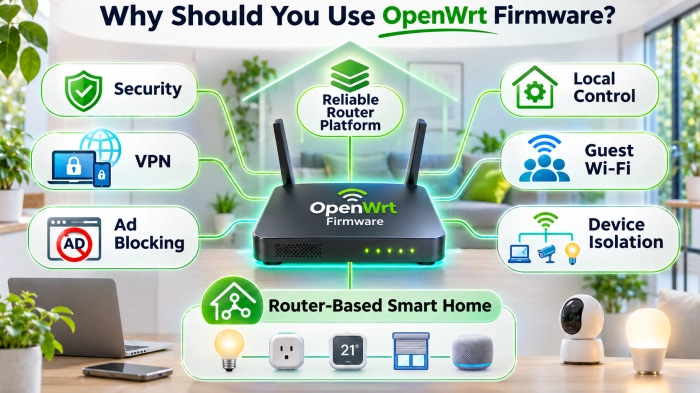
A modern home router can do much more than simply provide internet connectivity and Wi-Fi access. With the OpenWrt open-source operating system, a suitable router can be transformed into a fully configurable networking, security and automation centre whose functionality is not restricted to the features originally provided by the device manufacturer.
OpenWrt allows users to create a more secure and controllable home network, implement network-wide ad blocking, establish secure remote access, isolate smart home devices and operate a wide range of additional local services.
OpenWrt is also the foundation of the Szélessáv Smart Home system developed by the Szélessáv Public Benefit Foundation. Our objective is to integrate home networking, network security and building automation into a locally operated, open-source system wherever practical.
OpenWrt is a Linux-based, open-source operating system developed primarily for routers and other embedded networking devices.
Unlike conventional factory-installed router firmware, OpenWrt is not a closed software environment with a predefined set of functions. Users can install additional software packages and configure the operating system according to their individual requirements.
OpenWrt can run on networking devices from various manufacturers, provided that the specific device model and hardware revision are supported.
Its web-based administration interface, LuCI, allows most common network settings to be configured through a graphical interface using a web browser. SSH access and a Linux command-line environment are also available for advanced users.
→ Official OpenWrt project website
Conventional home router firmware is generally designed to make the basic networking functions required by typical users easily accessible.
Although this approach can be convenient, it may expose only a limited proportion of the device's actual technical capabilities.
Extending the functionality provided by factory-installed firmware generally depends on the manufacturer. If a particular feature is not available through the administration interface, implementing it independently may not be possible.
OpenWrt, in contrast, is an extensible, general-purpose networking operating system that supports the installation of additional services.
| Characteristic | Conventional factory firmware | OpenWrt |
|---|---|---|
| Source code | Typically partially or entirely closed-source | Open-source operating system |
| Extensibility | Manufacturer-dependent | Additional installable software packages |
| Firewall configuration | Generally limited | Highly configurable |
| VPN server and client | Model-dependent | Multiple installable solutions |
| Network-wide ad blocking | Model-dependent | Available through additional packages |
| Guest Wi-Fi | Frequently available | Extensively configurable |
| VLAN and network segmentation | Model-dependent, often limited | Flexible configuration options |
| Traffic management | Depends on manufacturer-provided features | QoS and SQM capabilities |
| SSH access | Frequently unavailable | Available |
| Running custom applications | Generally unsupported | Possible within available hardware resources |
| Smart home hub operation | Generally unsupported | Possible on suitable hardware |
| Manufacturer cloud services | May be required for certain functions | Not required for basic operation |
| Security updates | Depend on the manufacturer's support period | Available according to OpenWrt release and device support status |
This comparison is general in nature. Some advanced factory firmware solutions provide features comparable to many OpenWrt capabilities. Services available under OpenWrt may also be limited by the hardware characteristics of individual devices.
A modern router is a low-power computer equipped with its own processor, RAM, storage and network interfaces.
OpenWrt allows the available resources of this computer to be utilised for additional networking, security and automation tasks.
Why operate a separate computer for every task when a sufficiently powerful router can perform several of these functions?
Modern home networks contain much more than computers and mobile phones. A typical household may have numerous different devices connected to the internet.
These may include:
These devices originate from different manufacturers, run different software and frequently establish external internet connections that are difficult for users to monitor.
OpenWrt provides greater control over which networks, services and internet connections individual devices are allowed to access.
With appropriate configuration, users can:
One of the most important benefits of OpenWrt is therefore the ability to configure home network operation according to individual requirements rather than relying exclusively on settings provided by the router manufacturer.
The router represents one of the most important security boundaries between the home network and the public internet.
The purpose of a properly configured firewall is to allow only necessary and authorised network connections while restricting unsolicited access attempts.
The OpenWrt firewall supports the creation of separate network zones and detailed traffic rules.
In addition to basic firewall functionality, specialised network security services can also be implemented using additional software packages.
However, installing OpenWrt does not automatically guarantee home network security. Appropriate configuration, strong authentication, disabling unnecessary services and regularly installing security updates remain essential requirements.
Software support for conventional routers frequently ends before the hardware itself becomes technically unusable.
A fully functional networking device that is only a few years old may no longer receive firmware updates or security patches from its manufacturer.
This can be particularly problematic for equipment that remains continuously connected to the public internet.
If the router continues to be supported by OpenWrt, installing a more modern operating system may extend its useful and secure service life.
The OpenWrt developers regularly publish new releases, bug fixes and security updates for supported versions.
However, this does not mean that every older router will remain supported indefinitely. Support for devices with insufficient memory or storage capacity may eventually be discontinued.
A router directly responsible for managing the internet connection should preferably run a currently supported OpenWrt release that receives security updates.
→ Devices supported by OpenWrt
→ OpenWrt releases and version information
Conventional browser-based ad blocking extensions generally operate only on the computer or browser where they have been installed.
However, home networks frequently contain devices on which conventional ad blocking applications cannot be installed.
With suitable additional software, OpenWrt can provide DNS-based blocking of advertisements and tracking services.
DNS-based filtering uses predefined blocklists to restrict the resolution of internet domains associated with advertisements, tracking services or known malicious content.
One important advantage is that filtering takes place centrally on the router. Separate ad blocking applications do not need to be installed on every compatible network device.
Several DNS filtering solutions are available for OpenWrt, including adblock, adblock-fast and, on suitable hardware, AdGuard Home.
DNS-based filtering cannot remove every internet advertisement. Advertisements delivered from the same internet domain as the content requested by the user are particularly difficult to block using DNS-based methods.
Devices using their own DNS servers or encrypted DNS connections may also require additional network configuration.
Network-wide ad blocking does not completely replace browser-based content filtering, but it can provide an effective complementary solution.
Users frequently need to access services within their home network while away from home.
Such services may include:
Making individual services directly accessible from the public internet through port forwarding can increase the attack surface of the home network.
A more secure approach may be to operate an appropriately configured VPN server.
A VPN (Virtual Private Network) establishes an encrypted and authenticated network connection between a remote device and the home network.
Once the VPN connection has been established, remote users can access authorised internal services in a manner similar to being directly connected to the home network.
OpenWrt supports several VPN technologies. Two of the best-known solutions are:
| Technology | Characteristics |
|---|---|
| WireGuard | A modern, efficient VPN technology with relatively straightforward configuration. |
| OpenVPN | A widely used, highly configurable VPN solution supporting multiple authentication methods. |
Operating a VPN server on the router eliminates the need to expose every individual home network service directly to the public internet.
Remote mobile phone or computer
↓
Encrypted VPN connection over the internet
↓
OpenWrt router – VPN server and firewall
↓
Authorised internal network services
Operating a personal VPN server also requires appropriate internet connectivity. If the internet service provider uses CGNAT or otherwise restricts incoming connections, additional networking solutions may be necessary.
OpenWrt also supports dynamic DNS services for tracking changes in dynamically assigned public IP addresses.
When visitors arrive at our home, we often want to provide internet access without simultaneously granting them access to the entire internal network.
On a conventional shared Wi-Fi network, guest devices may connect to the same local network as personal computers, network storage devices and smart home equipment.
OpenWrt allows a separate guest network to be created with its own Wi-Fi name, IP address range and firewall rules.
The guest network can be configured so that connected devices can access the internet but cannot access internal home network services.
Communication between individual guest network devices can also be restricted when required.
Separate DNS settings, network access rules and bandwidth limitations can also be applied to the guest network using appropriate traffic management solutions.
From a security perspective, smart home devices may belong to a different category from regularly updated computers and mobile phones.
Some inexpensive network-connected devices receive limited software support, are difficult to monitor or continuously communicate with external manufacturer-operated servers.
There is not necessarily a reason for a smart socket, IP camera, air conditioner or robot vacuum cleaner to access the same network on which personal documents and other sensitive information are stored.
OpenWrt allows separate network segments and security zones to be established.
| Network | IP address range | Application |
|---|---|---|
| Internal LAN | 192.168.1.0/24 | Computers, phones and trusted personal devices |
| Smart home (IoT) | 192.168.20.0/24 | Sensors, smart switches and air conditioning units |
| Camera network | 192.168.30.0/24 | IP cameras and video surveillance equipment |
| Guest network | 192.168.40.0/24 | Visitors' mobile phones and computers |
| VPN network | 192.168.50.0/24 | Authenticated remote access |
The table illustrates an example network architecture. IP address ranges and access rules can be configured according to individual requirements.
Communication between separate networks can be controlled by the OpenWrt firewall.
For example, the Domoticz controller can be allowed to communicate with smart home devices while preventing those devices from initiating unrestricted connections to personal computers.
For smart home devices supporting appropriate local communication, internet access can even be blocked entirely while local automation functions continue to operate.
A locally operated temperature sensor, relay module or heating valve may only need to communicate with the local smart home controller.
Restricting unnecessary internet connections can reduce privacy and network security risks.
One of the fundamental principles of Szélessáv Smart Home is that home automation should operate locally wherever possible, without mandatory dependence on external manufacturer-operated servers.
A residential internet connection is generally shared by multiple users and numerous devices simultaneously.
During large file downloads, cloud backups, video streaming or torrent traffic, other applications may become slower or experience increased network latency.
The problem is not always insufficient nominal internet connection speed. Excessive packet buffering within networking equipment can also introduce considerable latency.
This phenomenon is known as bufferbloat.
With suitable software packages, OpenWrt supports intelligent network traffic management. SQM (Smart Queue Management), for example, can help reduce network latency when an internet connection is heavily utilised.
Appropriate configuration may improve:
Traffic management does not increase the physical data transmission speed provided by the internet service provider. Its purpose is to utilise available capacity more effectively and reduce excessive latency.
For high-speed internet connections, SQM requires a router with sufficient processing performance.
Internet connectivity is becoming increasingly important for both household activities and remote working.
With appropriate hardware and additional software, OpenWrt can manage multiple internet connections.
For example, a mobile internet connection can be used as a backup alongside a fixed-line internet connection.
If the primary internet connection fails, an appropriately configured system can automatically switch to the secondary connection.
Potential applications include:
Multiple internet connections can be managed using software such as mwan3, provided that it is supported by the selected OpenWrt release and network configuration.
Automatic failover does not necessarily mean that existing internet sessions will continue uninterrupted. Some applications may need to reconnect when the public IP address changes.
Many OpenWrt-compatible routers have USB ports to which an external hard drive or SSD can be connected.
By installing suitable software packages, the connected storage device can be made accessible across the local network.
The router can therefore operate as a basic network file server.
Potential applications include:
For example, OpenWrt can run the Transmission BitTorrent client, which can be controlled through a web-based user interface.
One advantage is that a desktop computer does not need to remain continuously switched on to perform downloads.
However, a router cannot always replace a high-performance NAS system. File transfer speeds, the number of simultaneous connections and storage performance are significantly influenced by the device's hardware capabilities.
For more demanding download or storage tasks, using a separate OpenWrt device may be preferable to avoid overloading the primary router responsible for managing the internet connection.
One of the important characteristics of the Szélessáv Smart Home system is that, on suitable hardware, the central home automation software can run directly on an OpenWrt router.
Since the router generally operates continuously as part of the home network, using its available processing power and memory for additional local services is a logical approach.
The Szélessáv SmartHome firmware combines the OpenWrt networking operating system with the Domoticz open-source home automation platform.
OpenWrt provides the networking infrastructure, while Domoticz manages sensors, switches, automation tasks and building services controllers.
| OpenWrt networking functions | Domoticz smart home functions |
|---|---|
| Internet connection management | Processing sensor measurements |
| Wired and wireless networking | Controlling switches and relays |
| DHCP and DNS | Heating and cooling control |
| Firewall and network security | Domestic hot water control |
| VPN server | Roller shutter and shading control |
| Guest and IoT networks | Automatic irrigation |
| Network-based presence detection | Presence-based automation |
| Network traffic management | Energy consumption data and graphs |
Combining these two systems allows the networking infrastructure and home automation services to be more closely integrated.
When devices supporting appropriate local communication are used, smart home operation does not require mandatory manufacturer-operated cloud services.
→ Official Domoticz home automation project website
Knowing whether someone is at home is frequently important for home automation.
Presence information can be used to automatically adjust heating, cooling, shading and the operation of various electrical appliances.
Most people regularly carry a mobile phone that connects to the home Wi-Fi network when they return home.
Because the OpenWrt router manages devices connected to the network, this information can also be used for presence-based automation with suitable additional software.
The Szélessáv Public Benefit Foundation has developed its own OpenWrt presence detection service for this purpose.
Different presence groups can be created within the system, with specific network devices assigned to each group.
The presence status of these groups can also be utilised by the DSVT heating controller, ASC automatic shutter controller and JEK Presence Switch.
Network-based presence detection does not guarantee the detection of a person's physical presence. A switched-off phone, disabled Wi-Fi connection or network communication failure may influence detection results.
The Szélessáv presence detection service is not part of a standard OpenWrt installation. It is available as part of our SmartHome firmware and can also be installed independently on a suitable OpenWrt system.
→ JEK Presence Switch for Domoticz
→ OpenWrt presence detection – open-source project on GitHub
In addition to standard Domoticz functionality, the Szélessáv SmartHome system provides independently developed controller modules designed to perform more complex automation and control tasks.
| Controller module | Function |
|---|---|
| DSVT – Heating and Cooling Controller | Up to 12 zones, predictive control, hybrid heat generation, domestic hot water and buffer tank control. |
| ASC – Automatic Shutter Controller | Intelligent shading based on light intensity, temperature and presence. |
| Automatic Watering System | Irrigation control based on schedules, soil moisture, recorded and forecast precipitation. |
| Solar Collector Controller | Control of solar thermal domestic hot water production and supplementary heating. |
| JEK – Presence Switch | Device automation based on network presence groups. |
Our independently developed controller modules are open-source and can also be installed individually on appropriately prepared Domoticz systems.
→ Open-source projects developed by the Szélessáv Public Benefit Foundation on GitHub
The operation of many commercial smart home systems depends partially or entirely on external cloud services operated by their manufacturers.
In some cases, controlling a local device requires the command to travel first to an external server over the internet and then back to the equipment located within the home network.
This approach can introduce several potential problems:
Combining OpenWrt and Domoticz makes it possible to establish a local system in which the central automation software operates within the home network itself.
| Characteristic | Cloud-dependent system | Local OpenWrt + Domoticz system |
|---|---|---|
| Control software execution | Partially or entirely on external servers | On a local network device |
| Effect of internet outages | Cloud-dependent functions may become unavailable | Local functions can continue operating when appropriately configured |
| Discontinuation of manufacturer services | Some functions may be lost | Local control may remain operational |
| Data storage | May also occur on external servers | Can be implemented using a local database |
| Customisation | Depends on manufacturer-provided functionality | Open-source and extensible system |
| Mandatory subscription | May be required depending on the provider | Not required for the basic system |
Local control requires connected sensors and actuators to support the necessary local communication methods. Some supplementary services, such as updating weather forecast information, may still require internet connectivity.
No. OpenWrt compatibility depends on the exact router model, hardware revision and technical design of the device.
Devices sold under the same commercial product name may have different hardware revisions containing different processors, Wi-Fi controllers or storage components.
The exact model and hardware revision must therefore always be verified before downloading and installing firmware.
Supported devices are listed in the official OpenWrt hardware database.
→ OpenWrt Table of Hardware – supported device database
Installing firmware intended for a different device model or hardware revision may render the router inoperable.
Before installing OpenWrt, users should also review the official installation instructions and available recovery procedures for their specific device.
OpenWrt hardware requirements primarily depend on the tasks that the router is expected to perform.
A basic internet router can operate satisfactorily on less powerful hardware than a system simultaneously providing VPN services, ad blocking, network storage and comprehensive smart home automation.
Several technical characteristics should be considered when selecting hardware:
| Application | Indicative RAM capacity | Storage |
|---|---|---|
| Basic router functionality | 128 MB or more | According to the requirements of the supported OpenWrt release |
| Router, VPN and DNS filtering | 256 MB or more | According to installed software package requirements |
| Multiple networking services running simultaneously | 512 MB or more | Larger internal or external storage recommended |
| OpenWrt and Domoticz smart home hub | 512 MB – 1 GB or more | Suitable internal storage or external SSD |
| Larger smart home system with numerous plugins and additional services | 1 GB or more | Higher-capacity storage suitable for sustained data writing |
The table contains indicative hardware recommendations rather than official minimum system requirements. Actual resource requirements depend on processor performance, network speeds, running services, software versions and smart home system size.
Managing a gigabit internet connection, high-speed encrypted VPN traffic and multiple resource-intensive services simultaneously also requires sufficient processor performance.
Many older routers have sufficient processor performance and RAM but relatively limited internal flash storage capacity.
This may restrict the installation of additional OpenWrt software packages.
On appropriately supported routers equipped with a USB port, the OpenWrt extroot mechanism can relocate the system's writable filesystem to an external storage device.
External storage devices may include:
With extroot, the originally available writable storage of only a few tens of megabytes can potentially be expanded to several gigabytes for additional software and data.
This can be particularly useful when installing Domoticz, Python, an MQTT broker or other additional services.
Extroot increases available storage capacity, not RAM capacity or processor performance.
For smart home systems involving continuous database and log file writes, storage designed for sustained data writing, such as an SSD, may be preferable to an inexpensive USB flash drive.
External storage introduces an additional potential point of failure. Regular backups of databases and important configuration files are therefore essential.
→ Extroot configuration in the official OpenWrt documentation
One significant advantage of OpenWrt is that it can provide new applications for many older networking devices.
An older router that is no longer suitable for providing high-speed connectivity across the entire home network may still be perfectly adequate for other tasks.
Potential applications include:
Reusing an existing supported router can reduce smart home installation costs and unnecessary electronic waste.
When selecting the primary internet router, however, security support, network performance and reliability may be more important considerations than the purchase price.
When establishing a new system, it is worth selecting a router with sufficient hardware resources that has been designed with OpenWrt compatibility as an important consideration.
OpenWrt One is a networking device specifically designed around the requirements of the OpenWrt project.
Important OpenWrt One hardware characteristics include:
With its available hardware resources, OpenWrt One can be a suitable choice for home networks that need to provide not only internet connectivity but also additional network security and smart home services.
OpenWrt One is one of the recommended hardware platforms for our Szélessáv SmartHome firmware.
However, OpenWrt One is not mandatory. The Szélessáv Smart Home system can also operate on other supported OpenWrt devices with sufficient hardware resources.
→ OpenWrt One – official hardware documentation
OpenWrt is an open-source operating system that can be downloaded and used free of charge.
The basic operating system does not require the purchase of a software licence or a mandatory monthly subscription.
Actual costs are primarily determined by the selected hardware, additional equipment requirements and any installation work.
If a suitable OpenWrt-compatible router is already available, switching to OpenWrt may be possible without purchasing new hardware.
More complex installations may require additional expenditure on:
The SmartHome firmware and independently developed home automation controller modules provided by the Szélessáv Public Benefit Foundation are also available free of charge.
Many smart home systems operate on a dedicated computer, mini PC or other central control device.
A separate controller may be appropriate in certain circumstances, particularly when the automation system requires substantial computing performance, large storage capacity or specialised hardware.
However, a sufficiently powerful OpenWrt router may be adequate for managing the sensors, switches, heating system, roller shutters and other automation tasks of a typical residential building.
Since the router already operates continuously, running the smart home software directly on it may eliminate the need to purchase and continuously power an additional dedicated computer.
| Continuous electrical power consumption | Annual electricity consumption |
|---|---|
| 5 W | 43.8 kWh |
| 10 W | 87.6 kWh |
| 15 W | 131.4 kWh |
| 20 W | 175.2 kWh |
| 30 W | 262.8 kWh |
The table assumes continuous operation for 24 hours a day, 365 days a year. Actual savings must also account for any additional electricity consumption resulting from running smart home software and supplementary storage devices on the router.
A sufficiently powerful OpenWrt router can provide internet connectivity, network security, VPN services, DNS filtering, presence detection and smart home automation on a single central device.
This can reduce the number of separate devices, electricity consumption and, in certain circumstances, the overall cost of establishing the system.
Operating several different services on one device can provide numerous advantages, but certain risks must also be considered.
If the router fails, becomes overloaded or is restarted, both internet connectivity and smart home services running on that device may temporarily become unavailable.
For larger installations or systems with higher availability requirements, separating networking and automation tasks across different devices may therefore be appropriate.
The Szélessáv Smart Home architecture does not require Domoticz to run directly on the primary router responsible for internet connectivity.
The automation software can also operate on a separate OpenWrt router or another compatible Domoticz controller.
An appropriate system design should consider:
Required independent safety protection for heating and other building services equipment must not rely exclusively on the operation of central smart home software.
OpenWrt provides considerably more configuration options than typical factory-installed router firmware. Consequently, it may initially appear more complex.
However, the LuCI web-based administration interface allows most common settings to be configured through a graphical user interface.
These settings include:
Basic OpenWrt operation does not necessarily require programming knowledge.
However, more complex network architectures, multiple security zones, VPN servers and custom software installations may require networking and Linux knowledge.
One of the objectives of developing the Szélessáv SmartHome firmware is to simplify the individual installation and preparation of the software components required for home automation.
Szélessáv SmartHome firmware is not an independent operating system separate from OpenWrt.
It is based on the OpenWrt open-source networking operating system, supplemented with software required for smart home operation and our independently developed automation components.
Installing standard OpenWrt does not automatically provide Domoticz, DSVT or the other Szélessáv smart home controllers.
The objective of Szélessáv firmware is to provide the necessary software installation and initial system preparation through a unified solution wherever practical.
| Function | Standard OpenWrt | Szélessáv SmartHome firmware |
|---|---|---|
| Basic networking and router functionality | Yes | Yes |
| LuCI web administration interface | Depends on the selected build | Included in the system |
| Domoticz | Requires separate installation | Prepared or installed according to the selected firmware variant |
| Python environment and required dependencies | Can be installed separately | Prepared according to the selected firmware variant |
| DSVT heating and cooling controller | Requires separate installation | Available as part of the SmartHome system |
| ASC automatic shutter controller | Requires separate installation | Available as part of the SmartHome system |
| Network-based presence detection | Requires separate installation | Available as part of the SmartHome system |
| Dedicated HTML control interfaces | Require separate installation | Prepared for the controller modules |
| Zigbee2MQTT | Requires separate installation | Available in the dedicated firmware variant |
| Hungarian and English smart home databases | Not included in the basic installation | Available through the installation solutions |
The exact selection of preinstalled software depends on the firmware variant and hardware platform. Current download and installation documentation should always be consulted for detailed package information.
Our independently developed smart home components are also available individually. Users who already operate OpenWrt or Domoticz can therefore install only the additional functions they require.
→ Szélessáv SmartHome firmware and downloads on GitHub
Despite its numerous advantages, OpenWrt also introduces certain limitations and additional responsibilities.
OpenWrt is therefore not necessarily the simplest solution in every situation. However, with suitable hardware and configuration, it provides considerable freedom in designing and extending a home network.
OpenWrt can be particularly beneficial for users who want their home network to provide more than basic internet connection sharing.
Using OpenWrt does not require an existing smart home system. Its network security, privacy and network management benefits can also be utilised independently.
Smart home automation can subsequently be added to an appropriately designed networking infrastructure.
OpenWrt allows a suitable router to perform numerous additional services beyond conventional internet connection sharing.
Its highly configurable firewall, VPN server capabilities, network-wide ad blocking, separate guest and IoT networks and support for local services make it possible to establish a more secure, controllable and extensible home network.
OpenWrt is a valuable networking operating system in its own right, regardless of whether smart home devices are used.
The Szélessáv Smart Home system extends this networking infrastructure with the Domoticz automation platform and independently developed controller modules from the Szélessáv Public Benefit Foundation.
A modern home network should not only be fast but also secure, reliable, controllable and extensible.
OpenWrt allows users to determine how their own network operates, which services are available and which devices are permitted to access them.
This networking foundation can subsequently support local, cloud-independent heating control, shading, irrigation and other home automation functions.
The objective of the Szélessáv Public Benefit Foundation is to develop an open-source home infrastructure in which control over networking, security and automation remains in the hands of the user.
→ Discover and download the Szélessáv SmartHome firmware